<![CDATA[about:benjie]]>2017-08-04T17:48:45+01:00http://www.benjiegillam.com/Octopress<![CDATA[Switching to Yarn Workspaces: an Example]]>2017-08-04T09:45:27+01:00http://www.benjiegillam.com/2017/08/switching-graphile-to-yarn-workspacesWow, it’s been a fair while since I last blogged! Well: let’s get straight to it!
Yesterday I discovered that yarn (the alternative npm client from Facebook)
had introduced a new feature called yarn workspaces which makes working with
monorepos a lot easier. I’m working on a couple of projects recently that use
the monorepo approach (one is a client project in which I introduced the
monorepo approach to share code between React, React-Native and Chrome
extension apps easily; the other is the Graphile OSS
project I’m currently working on). We’ve had a few
minor irritations working with lerna, the most notable of which is that when
we want to install a new dependency we can’t just yarn install it - instead
we have to add it to package.json and run lerna bootstrap again. At first
this wasn’t so bad, but it quickly becomes a chore!
Upon reading the
announcement it
immediately sounded like yarn workspaces would solve this problem (and more!)
so I decided to get on board!
So, without further ado, here’s how I switched
graphile-build to yarn workspaces (still with
lerna):
First we must install v2.0.0 of lerna and v0.28+ of yarn; currently yarn@latest is 0.27.5, so:
1
npm i -g lerna@latest yarn@rc
Now, since yarn workspaces is experimental we must manually enable this feature:
1
yarn config set workspaces-experimental true
We must also enable useWorkspaces in our lerna.json - open it up and add the following:
1
"useWorkspaces":true,
We also need to declare that this project uses yarn workspaces (which is
independent of Lerna), so in package.json ensure that private is set to
true, and add the workspaces key:
1234
"private":true,"workspaces":["packages/*"],
Now we’re pretty much ready to go, so let’s clear out the old stuff and start afresh:
]]><![CDATA[Long Live CoffeeScript and Long Live ES6]]>2015-02-12T17:15:00+00:00http://www.benjiegillam.com/2015/02/long-live-coffeescript-and-es6Clearly ES6 is a huge improvement over ES5, and tools like 6to5 allow us to use these cool features now. I was reading Replace CoffeeScript with ES6 by Blake Williams and thought it was a great summary of how ES6 solves many of the same problems that CoffeeScript solves; however I’d like to comment on a few of Blake’s points and talk about why I’ll be sticking with CoffeeScript.
Classes
Classes in ES6 (like many of the syntax changes in ES6) are very similar to the CoffeeScript equivalent. To support browsers that are not fully ES5 compliant (e.g. IE8-), however, we still can’t really use getters/setters, so ignoring these the comparison is:
I definitely like the way this is headed - no need for commas, no need to write function all over the place; but I’m in the “write less code” camp, so I prefer the former. However this is really a matter of taste so if you’re happy with typing this. instead of @ and adding in all the extra curly brackets it definitely backs up Blake’s statement that ES6 is a viable alternative.
That said, I much prefer CoffeeScript’s implementation of super, though I can see why ES6 went the way they did allowing you to call a different method on the object’s super.
Interpolation
Clearly ES6’s and CoffeeScript’s string interpolations are very similar; CoffeeScript interpolates for normal "strings", whereas ES6 uses `backtick escaped strings` (which are annoying to write in Markdown, by the way). CoffeeScript uses #{var} whereas ES6 uses ${var}. All much of a muchness at this point.
Where the difference really stands out is in the handling of whitespace - ES6 (or at least the 6to5 tool) includes all the whitespace between the `s (including newlines and indentation), whereas CoffeeScript either joins with a single space in the case of simple " strings or preserves all whitespace accounting for indentation level in the case of """ block strings. To my mind both of these behaviours are desirable, whereas ES6’s is not, take for example:
The output from passing this through 6to5’s REPL is:
1
varstr="This is quite a long first line\n so I wrap it to a second line and then\n append the value "+val;
CoffeeScript equivalents:
123456789101112
do->foo = (bar, val) ->ifbarstr = "This is quite a long first line so I wrap it to a second line and then append the value #{val}";str2 =""" This is quite a long first line so I wrap it to a second line and then append the value #{val} """
produce
12
varstr="This is quite a long first line so I wrap it to a second line and then append the value "+val;varstr2="This is quite a long first line\nso I wrap it to a second line and then\nappend the value "+val;
I can’t think of a situation where I’d prefer 6to5’s implementation.
Fat Arrows, Default Arguments
Brilliant additions to the JS syntax, these behave the same as CoffeeScript’s but with ever-so-slightly different syntax rules.
Splats
Another brilliant addition, but I find splats can be quite powerful in the middle of an argument list, particularly in Node.js-style callback situations so that the callback is automatically popped off the end. For example:
Sadly ES6 only allows splats at the end, requiring you to then manually pop() the callback (or lastName), making your code longer and making you choose more variables names (and we all hate picking variable names right?):
I must say I do like that ES6 lets you leave true blanks when doing var [first, , last] = [1, 2, 3] but using an underscore or similar is a one character workaround.
ES6 does object de/structuring pretty much the same as CoffeeScript (var {a, b} = {a: 1, c:3}, var {foo: a, bar: b} = {foo: 1, baz: 3} and var c = {a, b}) however there’s a slight circumstance where CoffeeScript does it better: when referencing properties off of the current object, e.g. c = {@a, @b} (var c = {a: this.a, b: this.b}).
Things ES6 has that I wish CoffeeScript had
It wouldn’t be fair to try and paint CoffeeScript as a perfect language - it certainly is not without its faults. Here’s a list of features from ES6 (and even ES3) that I miss in CoffeeScript:
The ternary operator a ? b : c (if a then b else c is too verbose for my taste; that said there’s no way I’d give up the ? operator!)
All in all ES6 is a great leap forward for JavaScript and my huge thanks to all the developers who have made this possible. Not mentioned above are many of the features that ES6 has added that don’t involve syntax changes and hence CoffeeScript can use without changes, such as Proxies, WeakMaps and much more. (We even have yield now too.)
I still prefer CoffeeScript’s syntax and find it very readable yet concise which significantly boosts my productivity. I would also find it hard to give up all CoffeeScript’s various syntax sugars, such as: object?.property which doesn’t throw if object is null/undefined; a ?= b, a ||= b, etc.; implicit returns; unless; improved switch; ranges [a..b]; array/string slicing with ranges arr[2..6]; for own k, v of obj; chained comparisons a < b < c; block RegExps; and many more!
Long live CoffeeScript and long live ES6!
]]><![CDATA[Quantum JavaScript?]]>2013-06-06T09:31:00+01:00http://www.benjiegillam.com/2013/06/quantum-javascriptTL;DR: In Chrome or Safari’s JavaScript console (or in jsc, but not node), run the following:
a) Why is the first result wrong?
b) Why does storing it to a variable (observing it) change it?
(The answers are below.)
My friend Anton pointed out to me this short ‘WAT’ talk by Gary
Bernhardt from 2012. It did something that confused me somewhat.
Here’s what Gary’s example was:
Now 1 and 2 are fine, but 3 and 4 immediately went against what I was
expecting - it truly was a ‘wat’ moment. I noticed was he was running
this in JavaScriptCore, let’s see what Node.js makes of it:
Node.js seems to be doing exactly what I’d expect - using the
+ as string concatenation (since the leading argument is not numeric).
So it’s calling .toString() on everything to produce the results you
see above (an Array’s toString is effectively return this.join(","),
and since it’s empty it just returns the empty string).
So what’s going on?! Let’s try V8 (the engine behind Node.js) in the
browser (Chrome):
1234
>{}+[]// 30>{}+{}// 4NaN
So… V8 in the browser agrees with JSC, not Node, and is behaving
in this strange fashion. But wait!
1234
>vara={}+[];undefined>a"[object Object]"
In the words of Gary: WAT?! By storing the value to a variable I’ve
changed it’s value? This immediately reminds me of the Heisenberg
Uncertainty Principle - that by observing something you implicitly
change what it is; only in this case the observation is effectively
storing it to a variable. Quantum JavaScript?
If you want to figure this out yourself, take a while to ponder this now
before reading on…
Read on for the spoiler
Digging further, I realise that I could reproduce this by calling eval
(which is basically what the E in REPL stands for). This allowed me to
reproduce the same thing in Node:
At this pointed I cheated: I hopped on over to #javascript on
irc.freenode.net and asked there. After some pondering, ckknight
figured it out (with a little help from DDR_ and Havvy). Here’s the
highlights:
DDR_     : Benjie: I think that {} is interpreted specially somehow in the console.
Havvy    : >> ({}) + ({})
ecmabot  : Havvy: (string) '[object Object][object Object]'
Havvy    : >> {}
ecmabot  : Havvy: undefined
ckknight : I get it
DDR_     : I'm guessing it's ambiguous or something.
ckknight : {} + {} turns into {}; (+{})
ckknight : since the first is interpreted as a block statement
ckknight : and then you have a unary + and an object
You can read the full transcript at the bottom of this post.
ckknight figured out that the first {} was being interpretted as a
code block, rather than an object literal, and JavaScript’s automatic
semicolon insertion (ASI) was taking over and changing the code to be
interpretted like so:
1234
>{};+[]// 30>{};+{}// 4NaN
The {}; is ignored (empty code block), and the leading + coerces
the values to a number, which is equivalent to:
So - mystery solved: storing to a variable gives the JavaScript
interpretter enough context to interpret the first {} as an object
literal and not a code block.
And I’m guessing that Node’s REPL, rather than calling plain eval("{} +
{}"), does something a little more complex - perhaps like this:
thereby (coincidentally?) side-stepping the issue.
IRC Transcript
Benjie   : When I type `{} + {}` into the javascript console (JSC or
         > Chrome inspector or Safari inspector; note: not node.js REPL) I get
         > `NaN` - why is this not the same as when I type `var a = {} + {}; a`
         > (which gives me `[object Object][object Object]`?
Benjie   : i.e. why does storing it to a variable somehow change it's
         > value. (Or more specifically, at a guess, how does the javascript
         > console coerce values and why isn't it the same as normal coercion?)
ckknight : Benjie: seems like an implementation flaw, like a bug seeped in
DDR_     : Benjie: I think that {} is interpreted specially somehow in the console.
Havvy    : >> var a = {} + {}; a
ecmabot  : Havvy: (string) '[object Object][object Object]'
Havvy    : >> {} + {}
ecmabot  : Havvy: (number) NaN
Havvy    : >> ({}) + ({})
ecmabot  : Havvy: (string) '[object Object][object Object]'
DDR_     : The second way is the correct (sob) way.
ckknight : >> {} + ({})
ecmabot  : ckknight: (number) NaN
ckknight : >> ({}) + {}
ecmabot  : ckknight: (string) '[object Object][object Object]'
ckknight : qwies
ckknight : weird*
Benjie   : ^_^
DDR_     : {} is undefined.
Havvy    : >> {}
ecmabot  : Havvy: undefined
DDR_     : In the console.
DDR_     : Heh, yes.
Havvy    : >> undefined + {}
ecmabot  : Havvy: (string) 'undefined[object Object]'
ckknight : DDR_: as an expression, yes
Havvy    : >> undefined + undefined
ecmabot  : Havvy: (number) NaN
ckknight : err
ckknight : as a statement, yes
ckknight : oh
ckknight : I get it
DDR_     : I'm guessing it's ambiguous or something.
DDR_     : I don't. :P
ckknight : {} + {} turns into {}; (+{})
Havvy    : {}; (+{})
Havvy    : >> {}; (+{})
ecmabot  : Havvy: (number) NaN
ckknight : >> {} + {}
ecmabot  : ckknight: (number) NaN
Havvy    : ckknight: Yeah, that could very well be it.
ckknight : since the first is interpreted as a block statement
ckknight : and then you have a unary + and an object
DDR_     : Ah.
Benjie   : ckknight: so the first {} is interpretted as a block
         > statement. Fascinating, I'm impressed you reached that conclusion so
         > quickly!
]]><![CDATA[My Favourite Git Commands V: Yet More]]>2013-05-01T16:25:00+01:00http://www.benjiegillam.com/2013/05/favourite-git-commands-vThis is part 5 in my Favourite Git
Commands series.
For those commands you type frequently, it’s nice to have your shell
alias them for you:
alias gs='git status '
alias ga='git add '
alias gb='git branch '
alias gc='git commit'
alias gd='git diff'
alias gds='git diff --staged'
alias go='git checkout '

alias got='git '
alias get='git '
Commands to use sparingly
These are commands that make it very easy to get messy code all up in
your git history. And no one wants messy git history.
git commit -a
Are you sure you want to commit every single line? Really really sure?
If you’re going to do this always always do a git diff beforehand
to make sure silly changes haven’t made their way in. Probably better
to use git add --patch and then just git commit though, as
discussed in post 1.
git add -A
Really? All?! Be a little selective!
Pushing and pulling
git push --set-upstream [remote] [branch]
Want git push to just work? Just do one push using the above syntax
and future git pushes will know what to do. (Shorter: git push -u.)
You should also look into git’s push.default setting, and set it to
suit your needs.
git pull --rebase
If you want to apply your local commits linearly on top of the remote
commits (rather than in parallel via a merge as would be normal) then
you can use this command. I use it if I make changes from two different
computers in unrelated areas.
Try not to over-use it - you should only use it where it improves the
clarity of the history - git is very clever and a normal git pull
resulting in a merge is generally preferred. Rebasing loses context of
your commits (by modifying the patches to apply against later versions
of the code) which makes it harder for others to understand the
reasoning behind your changes.
]]><![CDATA[My Favourite Git Commands IV: Cleaning Up]]>2013-04-28T14:25:00+01:00http://www.benjiegillam.com/2013/04/favourite-git-commands-ivThis is part 4 in my Favourite Git
Commands series.
Cleaning up
Whether you want to do a quick bugfix in a different branch or just get
rid of all your debugging, keeping your working directory clean is a
good idea. Another way to do this is to use git reset --patch from
part 1.
git stash
The stash is where you can store local modifications which you can then
restore later.
Quickfix in other branch
If you need to hop to another branch but you’re in the middle of
something then this type of thing works great:
git stash                # Save all local changes to stash
git checkout release     # Switch to branch needing quick fix
# Perform fix here
git commit               # Commit the fix to the release branch
git checkout feature     # Return to the feature branch you were on
git stash apply          # Re-apply the changes that you saved to stash
git stash drop           # If the above went well, tidy up
Testing staged changes
If you have a lot of changes in your working copy that you don’t want to
commit (e.g. debugging) but you want to test your staged changes then
you can do the following:
git stash --keep-index   # Remember index===staging area
# Perform tests here
git stash pop            # apply/drop all in one
If you’re planning to keep the changes on the stash for longer then I’d
advise you to use git stash apply followed by git stash drop over
git stash pop as if the apply fails you still have your original
changes in the stash and it’s easier to resolve.
git reset --hard HEAD
This will clear out your staging area and working copy, checking out a
fresh copy of HEAD. Use with caution as it does not store the work
that is discarded. git reset --hard HEAD^ will do the same, but will
also throw away your top commit on the current branch as well.
git stash; git stash drop
This is similar to the above, but it actually stores the code into git’s
local files (before deleting the reference) so it is ever-so-slightly
safer. Note this will be lost when git next does garbage collection.
]]><![CDATA[My Favourite Git Commands III: Editing History]]>2013-02-22T09:52:00+00:00http://www.benjiegillam.com/2013/02/favourite-git-commands-iiiThis is part 3 in my Favourite Git
Commands series.
Editing History
You should never change a commit that has been shared with someone else
- it makes everything very confusing for your collaborators. This is one
of the many reasons you should always be aware exactly what you’re
committing. However…
It’s often useful to edit, reorder, split or merge your local (unpushed) commits
- for example you might want to fix a bug you introduced 2 commits ago
that you don’t want anyone to ever know about. EVER. This ability to
easily edit history, fix mistakes in commits (for example if you
accidentally added a password) and generally control your revision
history is one of the things that makes git so powerful in my opinion.
git commit --amend
Sometimes working on the next commit reveals a bug or typo in a previous
commit, in that instance
it often makes sense to apply a fix to the previous commit
directly. This will save time for your collaborators who may
immediately spot the mistake, make a note of it or tell you about it,
only to find out that you fixed it in the next commit. Better to fix it
so no-one else has to process it, I think.
Other times you may notice you forgot to add a file or said n instead
of y to one of the git add --patch hunks. To fix these situations
simply add any missing files, changes or fixes; review these changes;
and then git commit --amend.
You can also use this if you just want to change the commit message and
nothing else, but be aware that this still changes the commit’s hash,
so you still shouldn’t do this on commits that have been pushed.
git reset --soft HEAD^
This is useful if you messed up so bad you want to
remove the last commit and try again
- it resets the current branch to the first parent of HEAD and moves the
committed hunks back to the staging area. One reason you might want to
do this is if you accidentally did a git commit -a and committed more
code than you intended to. (Tip: you can move changes from the
staging area to the working copy with git reset HEAD [filename].)
If you want to throw away the code altogether then you can swap --soft
for --hard (warning: this discards your working copy changes too).
Before doing this it might make sense to branch - e.g. git branch
messed_up_code - and stash your changes with git stash. When you’re
happy you did want to discard that code, you can delete this branch with
git branch -d messed_up_code and drop the stash with git stash drop.
git rebase --interactive HEAD~3
Almost everything in git can be achieved with the use of git rebase.
Interactive mode is a great introduction to this very powerful mode, and
is useful for squashing (merging), reordering, dropping or editing
commits. When you run this command, it will allow you to chose various
options for each of the last 3 commits (see the help text at the bottom)
and then it will guide you through making the changes. Note that you can
reorder or drop commits by rearranging or deleting their lines.
For example, to edit the 3rd commit ago, I’d run the above command and
then change the relevant pick to edit in the editor that appears,
then save and exit. Git will then revert me back to that commit, where I
can make changes to the files in the local copy, and then git add
--patch and git commit --amend. When I’m happy with the result I
simply git rebase --continue and git will apply the future commits on
top of my newly edited commit. Recent versions of git very helpfully
tell us what we need to do at each stage.
Rebase commands in my version of git are:
pick = use commit
reword = use commit, but edit the commit message
edit = use commit, but stop for amending
squash = use commit, but meld into previous commit
fixup = like squash, but discard this commit’s log message
exec = run command (the rest of the line) using shell
(and don’t forget you can also drop and reorder commits by deleting or
rearranging their lines.)
]]><![CDATA[My Favourite Git Commands II: Viewing Changes/History]]>2013-02-20T14:25:00+00:00http://www.benjiegillam.com/2013/02/favourite-git-commands-iiThis is part 2 in my Favourite Git
Commands series.
Viewing Changes/History
A distributed version control system is very useful at helping you to
track down bugs, revert to previously working versions, and especially
for collaborating with other (remote) users. But you can lose many of
these benefits if you don’t keep your revision history tidy.
I find the best way to do this is to
keep each commit small and focussed on just one feature.
Unrelated changes and fixes should go in their own
commits, even if this means that you’re committing just one line: “fix
typo in random number generator.”
Keeping a tidy revision history is especially useful if you ever need
git bisect to help you track down a bug a number of
commits ago - when you find the commit that introduces the bug it should
be easy to see what line caused it because there won’t be any unrelated
lines in that commit.
To help you keep a tidy revision history
you should always be aware exactly what you’re committing.
When you pull changes from another user you should always look through
what they’ve done (which you can do with git show) so put yourself in
their shoes: when they look at your code they want to be able to scan
through the changes as fast as possible, and not have to try and
understand how unrelated changes fit in to implementing a specific
feature. They especially don’t want to see you adding debugging lines in
one commit, then removing them in a later commit, then adding them again
- this is noise that will get in the way of their timely understanding
of your changes.
git diff
You should be typing this many times a day, it shows you at a glance
what lines you have changed in your working copy. A great way of
reviewing just those lines for typos or bugs -
be your own pair programming partner!
git diff --ignore-space-change
Or git diff -b for short - this is particularly useful if you’ve
changed a lot of whitespace (e.g. you’ve decided to switch tabs for 2
spaces throughout) but want to make sure you didn’t accidentally edit
any lines of code.
It’s also useful if you’re using a whitespace sensitive language (e.g.
Python or CoffeeScript) and you know you indented a bunch of old code,
but just want to see your new modifications.
Also of use git diff --ignore-all-space / git diff -w which ignores
the difference between a line with whitespace and a line without.
Either way, if you use this then I’d still advise you use vanilla git
diff before committing, as this is what your collaborators will see
when they review your code.
git diff --staged
This command shows you the changes you have staged for the next commit.
I do this before almost every commit to check I’m only committing
exactly what I want to commit, and
when I forget to do this, I generally regret it.
git show HEAD~3
When you pull down someone elses changes, or before modifying history,
it’s generally a good idea to know what happened in each commit. I use
git show HEAD to review the last commit, this is very useful and
sometimes reveals that I added more than I meant to (or less). You can
use git show HEAD^^^ or git show HEAD~3 to view the 4th commit ago
if you want to go back further. (Note: each ^ means “this commit’s
first parent” so more ^s means further back. If your history is
non-linear you need to be more careful that you’re reviewing all the
relevant commits.)
git blame
Very useful for figuring out which commit a particular bug or typo came
from (so you can edit that bug out of history and no-one will ever know:
see part 3…). Try it now: git blame [filename] - pretty neat, isn’t
it? Also useful for debunking “it couldn’t possibly have been me that
wrote that messy code, it must have been you!”
git log
Of course, it’s generally a good idea to keep an eye on your git log
too, and this is why you want your commit messages to be short and to
the point. git log is a great command, and very flexible, but it has
so many options many people simply use git log and miss out on it’s
power!
Here’s a couple of my favourite git log aliases and how to add them to
your own configuration.
git lg
This is my preferred way of viewing history. It inherits from a number
of other peoples’, sorry I can’t remember their names right now.
]]><![CDATA[My Favourite Git Commands I: Patch]]>2013-02-19T14:25:00+00:00http://www.benjiegillam.com/2013/02/favourite-git-commandsThis is part 1 in my Favourite Git
Commands series.
Last year I wrote a post about how I intended to
switch over to and master the tools I’d always meant to but somehow
never got around to. Among these was git.
I’ve now been using git exclusively for the last year (even when
interfacing with SVN projects I do so using the awesome git-svn
bridge) and I love it. It took me a while to form a decent workflow and
break the old SVN habits, so over the next few days I thought I’d share
with you some of my favourite git commands.
I’m going to assume that you’ve used git at least once or twice, and
know what I mean by repo (where the git history is stored, i.e. the
.git folder), HEAD (the top commit in the current branch), staging
area (where the files for the next commit are stored, also known as the
index or cache), and the working copy (the files that you’re modifying).
The --patch option
My friend Jasper helped a lot when I first started getting into git,
and noted one of his favourite commands was git add -i - an
interactive way of adding files to your staging area before commits. I
used this a lot, but found that mostly I was using the patch function,
and going through all the menus was unnecessarily slowing me down.
Enter:
git add
--patch
Or git add -p if you prefer. This command jumps straight to patch mode
on all your tracked files, asking you for each hunk whether you want to
add them to the staging area or not. I generally answer with one of the
following, though there are other options that can be useful:
y - yes, add this hunk
n - no, skip over this hunk
s - split this hunk into smaller hunks
e - edit this hunk, then add it (I normally use this to remove debugging
lines)
q - I’m all done adding stuff, go away.
This ensures that I can keep my debugging and other temporary mods out
of git, only adding the files I want to appear in git history. But
sometimes I accidentally add a line I didn’t mean to, so then I use:
git reset --patch
Or git reset -p if you prefer. This command is basically the opposite
of git add --patch - it enables you to move specific hunks back out of
staging and into your working copy. It accepts the same options as its
sibling above.
Tip: removing one line from the middle of a hunk
You can use the edit command to open the hunk in your text editor,
then change all the + at the beginning of lines for a space except on
the lines you want to remove. Remember this is removing a hunk, so a +
actually means “remove this line from the staging area”. (The spaces are
needed for context.)
When I have the staging area how I want it, I commit it (see below). But
then I’m left with all the lines I didn’t stage. Some of these I want to
keep whilst I work on the next commit, others I’m done with (mostly
console.log/NSLog statements, if I’m honest). So I want to
selectively delete modified lines from my working copy without having to
find them in my text editor. Enter:
git checkout --patch
Yes, or git checkout -p. This command is more dangerous as it throws
away the work you select, with no history of it (since it was never
committed). You select the hunks you want to throw away using the same
options as its siblings above. You can also use it for surgery-like
removal of lines at any time using the e option and the same tip as
git reset --patch but be very careful!
git [add/etc] --patch [filenames]
All the above commands accept file or directory names as an argument, so
you can just patch add/reset/checkout a small selection of files without
worrying about modifications to other unrelated files. This is
particularly powerful when paired with zsh’s globbing.
]]><![CDATA[LightwaveRF RF Protocol]]>2013-02-03T11:10:00+00:00http://www.benjiegillam.com/2013/02/lightwaverf-rf-protocolFollowing on from yesterday’s success, I’ve done a big data
capture of various commands and have figured out (mostly) the protocol.
As you saw yesterday, each command comprises 10 bytes. But actually,
each of these only ever take one of 16 values, thus they really
represent nibbles. The values of these nibbles are:
Then the payload is made out of 10 of these nibbles.
Level (2 nibbles)
The level is defined by nibbles 1 and 2, giving a range of 0-255 (NOTE:
this full range is not used, as far as I can tell). For simple commands
(on/off), the level is 0.
You can dim a light to one of the 31 different levels, but these levels
start at 129. I find that the easiest way to think of this is 0x80
+ dim level (from 1 to 31), where 0x80 is the hex representation of
the number 128. Note that to dim a light you simply use the ON command
- there isn’t a specific “dim” command.
As with dimming, for a MOOD command (see later), you add 0x80 to your mood value -
there are at least 5 moods supported: 0-4.
Subunit (1 nibble)
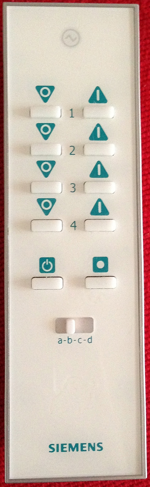
Each LightwaveRF remote can target 16 different “subunits” - e.g. the
remote shown has in effect 34 buttons - on and off the the 16 subunits
(A-D * 1-4) plus the two “global” buttons below.
Commands which communicate with all devices send the highest subunit
number, 15, where as simple commands can be sent to individual
subunits. On the remote above the subunits are 0=A1, 1=A2, 2=A3, …
14=D3, 15=D4.
Command (1 nibble)
LightwaveRF supports (by the looks of it) up to 16 commands. The ones
I’m aware of are:
LightwaveRF Commands
123456
 0 : OFF   (specify subunit, level=0)
 1 : ON    (specify subunit,
            send level = 0 to switch on to previous state, or
            level = 0x80 + level[1..31] to turn on to a specific
            level)
 2 : MOOD  (subunit = 15, level = 0x80 + mood[0..4])
Note on my mood remote (when the switch on the back is in “mood” mode)
the buttons (excluding the off button) from top left to bottom right
have moods: 2, 3, 4, 0, 1 - the ordering of which seems a bit bizarre.
Remote Identifier (6 nibbles)
The remainder of the payload I assume to be the identity of the remote
control, e.g.
Watch this space, I’ll be posting how to make your own LightwaveRF
transceiver using an Arduino soon. As always, the code is on
GitHub.
]]><![CDATA[Reverse Engineering LightwaveRF]]>2013-02-02T15:42:00+00:00http://www.benjiegillam.com/2013/02/reverse-engineering-lightwaverfI’ve been stumped for a little
while trying to decode LightwaveRF data using a
cheap 433.92MHz receiver and a Arduino Nano.
Today I’ve finally cracked it! Thanks to Geek Grandad’s
LightwaveRF GitHub repo I finally figured out the
missing link - my zeros were not zeros, but instead 10s! Sure, this
doesn’t make sense yet, but let me explain.
The setup
To capture the radio data, I used a cheap 433.92MHz receiver
hooked up to an Arduino Nano. The wiring was simple: just wire up +5V
and GND to the radio from the Arduino, and connect the DATA pin to
Arduino Nano digital pin 2. I wrote a quick and dirty receive sketch
and installed it to the Arduino. This sketch just listens for the
“CHANGE” event on the radio’s pin (i.e. when it transitions from 0 to 1,
or from 1 to 0) and then effectively times the duration it was in each
state (high or low).
For example, if it was low for 250us (microseconds) then high for 350us
then low for 250us, the sketch would output the equivalent of “250, 350,
250”. Each value was compressed down to 2 bytes and sent over the serial
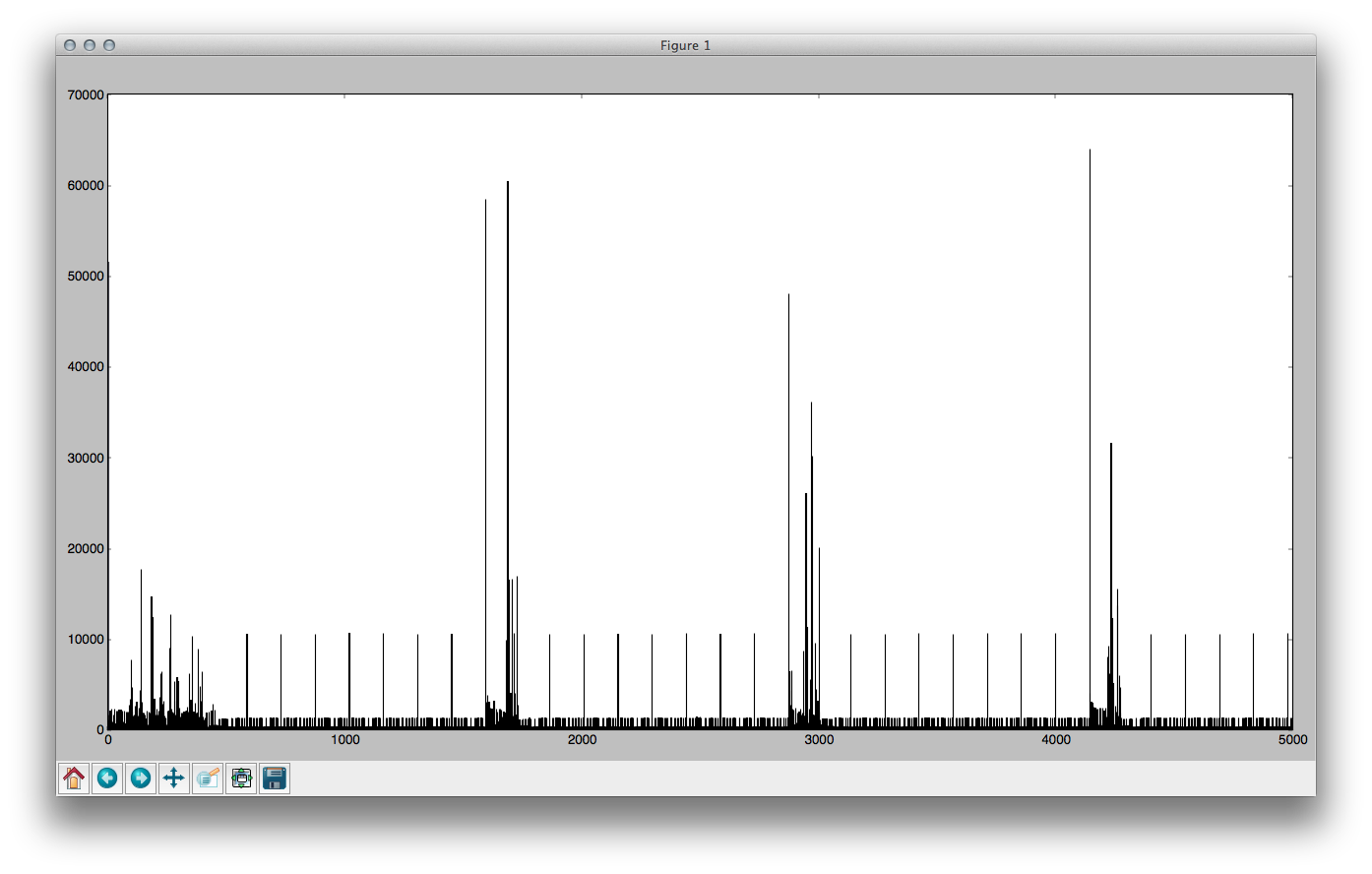
link to my python script, which would receive the data, decode it
back to textual numbers, write it to a capture file and then plot a
graph of it so I could check the data that was received made sense.
In the image above the regular bits is the sensible data (4 different
button presses, each automatically repeated to help with collisions) and
the areas in-between are just noise. The x-axis is the record number
(from 0 through to 5000) and the y-axis is the value of that record -
i.e. how long in microseconds the pin remained in one state before
changing.
Limitations
Due to not wanting to overflow the ringbuffer in the Arduino sketch
I only allowed each capture to go up to 5,000 records (which worked out
to be pretty variable, but generally a couple of seconds).
Capture
I have a LightwaveRF remove that’s basically a matrix of on/off buttons.
There are 4 sets of on/off buttons (8 buttons total), and then a slider
switch that has 4 positions, which effectively means that there are 16 *
2 = 32 buttons. I captured each of these, both pressed and held.
I also have a “Mood Remote” which I captured separately.
Analysis
Having captured the data, I then went about trying to decode it. I
noticed that every other record was of a similar duration, and the
alternating records varied but took two forms - either long or short - I
assumed therefore that this meant that they carried the data and as they
came in 2 lengths I arbitrarily stated that the short length was a zero,
and the long length was a 1.
This worked great - my captures came through very reliably - every time
I captured data for the same button it ALWAYS came out the same, and
different buttons always came out differently. Brilliant! But the data
just didn’t feel right; I felt there was something off. I tried to
analyse it but just came up empty each time - very frustrating.
Breakthrough
I had to give it a rest for a while because of having other things to do
- a newborn and trying to get So Make It off of the ground - so I
did nothing on it for a while, except write a few forum posts hoping
someone could shed some light, and asking around the helpful fellows of
SoutHACKton.
Finally today I decided to give it another go, and found Geek Grandad’s
repository. Reading through the code on there I
immediately noticed that he received/sent 10 bytes, whereas I was only
working with 8. This seemed wrong, but he was having success so I delved
deeper. I spent a while reading the receiving code before realising the
sending code would be much simpler to grok! And lo and behold I
discovered that he sent each bit, BIT, (0 is LOW, 1 is HIGH) using the
following method:
SEND BIT for 320us
SEND LOW for 345us
(And also that there were a lot of single bits separating the bytes and
the messages.)
Sending: High High High
Simply comes out as HIGH(320) LOW(345) HIGH(320) LOW(345) HIGH(320) LOW(345). Simple to decode. But…
Sending: High Low High
Comes out as HIGH(320) LOW(345) LOW(320) LOW(345) HIGH(320) LOW(345)
LOW(345).
Which is the same as HIGH(320) LOW(1010) HIGH(320) LOW(345).
And this meant that:
Long low periods imply a “10” rather than a “0”
So simply changing my decode script to recognise “10” and “1”
instead of “1” and “0” respectively, the data suddenly came out really
clearly (it’s frustrating how close I was!):
Remote F30537 sends the on signals for buttons 1 through 16
Clearly we can see that it’s subunit code is the equivalent of the first
subunit on the other remote. Bytes 1-6 are the same as the other remote,
so I assume that the ID of the remote is stored in the last 4 bytes;
though my RFXCOM only needs a 3 byte ID so there’s either a checksum or
some form of encoding going on here. It’s clear that there is no way to
encode “00” or “000” and so each byte doesn’t actually give 256
possibilities, but instead 55. I shall continue to ponder…
]]><![CDATA[Info Leak: Virgin Media]]>2013-01-29T11:08:00+00:00http://www.benjiegillam.com/2013/01/info-leak-virgin-mediaAt 10:57am today (29th Jan 2013) I received a call from 00501, which
according to phoneowner.info is commonly used by scammers (PPI
reclaiming, etc.). The man on the other end of the phone had a heavy
accent and the audio distortion on the line made it sound like it was
coming from overseas. The call went as follows:
Them: Hello sir, I’m calling from the technical department of your
broadband provider.
Me: Sorry, you’re calling from where?
Them: From your broadband provider.
Me: Oh, and which company is that?
Them: pause: Virgin Media
Me: surprised: Okay, hello.
They hang up: beeeeeeeep
They probably hung up because they figured it’d be too much effort to
try and scam me if I was asking questions before even greeting them.
I get a lot of spam calls, despite using the Telephone Preference
Service and rarely giving my landline out for anything, but this
one slightly surprised me: they knew I used Virgin Media. How did they
know that, I wondered? Was it just a fluke? Were they legit? Was it
just a bad connection making it sound like an overseas call? Then I
realised: it’s really easy to find out if someone used Virgin Media in
the UK.
How to find out if a phone number uses Virgin Media
If the phone number exists and is a Virgin Media number, they’ll display a status page.
If it doesn’t then they’ll tell you “We don’t recognise this phone
number. Please re-enter your full Virgin Media home phone number.”
Now this isn’t 100% reliable - you might use a different provider for
phone line, or you may have no landline at all. But for the most part (I
expect) a scammer could just try random combinations of digits in the
status page until they get a phone number that works, then phone them up
claiming (semi-convincingly) to be Virgin Media and telling them to
enter this command to wipe the viruses from this computer (or whatever
thing the scammers are doing these days). Then they’ll get confused
because Linux doesn’t have a “Start” button for you to press, and Ctrl+R
doesn’t do anything, and all that jazz…
Conclusion
I see this as an information disclosure leak and I think Virgin Media
should fix it. Postcode is fine for that status page, since it’s
(generally) not specific to one address like a landline (generally) is.
Or why not just make your status page visible to all - not requiring a
phone number/postcode/etc. This would show you are proud of the services
you offered and don’t want nor need to hide anything: why not have a
status chart like Amazon Webservices do.
]]><![CDATA[Octopress: CoffeeScript/JS code toggle]]>2012-07-04T19:13:00+01:00http://www.benjiegillam.com/2012/07/octopress-coffeescript-slash-js-code-toggleDru Riley asked via a comment how I
achieved the CoffeeScript/JS highlighting switch on my blog which looks like
this:
.coffee.js<-- These buttons toggle CoffeeScript/JavaScript
The answer: a hack. I don’t code ruby, so I couldn’t figure out how to
do it neatly (or even if I could - feedback welcome!). The easiest way for me to do it was
just to modify plugins/backtick_code_block.rb, then add the JS and CSS
to make it work.
If you want to see how I did it, or do it yourself, here are my diffs:
NOTE: These diffs should be ran against revision c069dc7 of Octopress,
which is already quite out of date…
Hack backtick plugin to highlight both JS and CS (plugins/backtick_code_block.rb.diff)download
]]><![CDATA[Node.JS SSL Certificate Chain]]>2012-06-28T09:32:00+01:00http://www.benjiegillam.com/2012/06/node-dot-js-ssl-certificate-chainI’ve just discovered that one of our servers is not serving up it’s SSL
certificate chain correctly. This is fine for modern web browsers who
trust the COMODO certificate, but for older browsers/operating systems
you need to support higher up the trust chain.
Previously I followed the technique in this article,
but it turns out that the ca parameter of the TLS/HTTPS server should
be an array. More than this, you cannot
just feed it an array containing your chain file as a string/buffer
(i.e. [fs.readFileSync("/path/to/mydomain.ca-bundle")]) since the Node
TLS module only reads the first certificate in each entry of this array.
To solve this you can parse your existing certificate chain:
]]><![CDATA[Node, Websockets, Safari and Emoji]]>2012-03-05T14:02:00+00:00http://www.benjiegillam.com/2012/03/node-websockets-safari-and-emojiIt seems emoji break websocket.io (the websocket
library used by socket.io). They seem to cause the message payload to
terminate prematurely.
After a morning of research on the subject, I was pointed at mranney’s
essay on the subject by `3rdEden on
irc.freenode.net/socket.io. It turns out that the issue
is due to V8 (the JavaScript engine used by Node.JS) using the
UCS encoding internally rather than the more modern UTF-16. Emoji
require 17 bits (their code values are larger than 65,535), which is
more than UCS can give (UCS uses exactly 2 bytes (16 bits) to represent
every character, so it only supports values between 0 and 65,535;
whereas UTF-8 and UTF-16 use a variable number of bytes).
I’ve confirmed with WireShark that Safari is sending valid UTF-8
(11110000 10011111 10011000 10010011 or hex: f0 9f 98 93, which
gives the Unicode codepoint U+1F613 😓). So I know it’s Node’s
issue receiving and processing it.
This is probably one of the reasons that Google Chrome doesn’t support
Emoji - check out this page in Chrome, then view it in Safari
to see what you’re missing! (Chrome uses the V8 engine.)
Solution
You could base64-encode your payload, or simply escape()/unescape()
it. Or you could trim anything outside of UCS. Or you could do a custom
encode/unencode such as this one. I’m not really happy with
any of these, so I’m still looking for a solution.
Update
In the end I implemented this (see below) on the client
side, and left the data encoded server side. All clients are responsible
for encode()ing characters when sending, and decode()ing upon
receiving (whether that be via websockets or HTTP). It seems to work
quite well and doesn’t massively inflate the content-size for ASCII and
possibly more[citation needed], so I’m relatively happy with it.
Besides it’s midnight and I need to get some sleep.
encode = (s) ->unescapeencodeURIComponentsdecode = (s) ->decodeURIComponentescapes
]]><![CDATA[Switching to Vim: The Easy Way - Commands]]>2012-02-27T16:50:00+00:00http://www.benjiegillam.com/2012/02/switching-to-vim-the-easy-way-iiContinuing from what we learned in part 1 (installing and
vimtutor), I’d now like to focus on the fundamental commands in Vim.
Commands
Vim commands are formed from a combination of verbs and targets. The
targets could be objects (words, sentences, paragraphs, lines, the
contents of parentheses) or movements (jump to end of word, jump to end
of paragraph, jump forward until the letter ‘e’, etc). Forming objects
generally involves the use of a modifier. You can also add
a count to perform the action count times.
Verbs
Here’s some example verbs (don’t try and learn them all at once!):
i - insert - enter insert mode
a - append - enter insert mode after the carat
I - enter insert mode at the beginning of the line
A - append to line (enter insert mode at the end of the line)
o - open a line after the current one and enter insert mode
O - open a line before the current one and enter insert mode
d[target] - delete (remove from the document and put in buffer)
y[target] - yank (copy)
p - paste the buffer after the cursor
P - paste the buffer before the cursor
c[target] - change (delete and then enter insert mode)
r[char] - replace the character under the cursor with [char]
x - delete the character under the cursor
u - undo the last command
Ctrl-R - redo the last undo (sidenote: in vim undo/redo forms a tree, changes aren’t lost)
/ - enter regex search mode
n - find the next instance of the search term
N - find the previous instance of the search term
. - repeat last change (extremely powerful)
Nouns/Movements
Nouns or movements are commands for moving within the document or
representing an area within a document. Common movements are:
h, j, k, l - equivalent to the arrow keys left, down, up,
right - you should aim to use these rather than the arrow keys, but
don’t worry too much yet!
0 - move to the very beginning of the current line
^ - move to the first non-whitespace character on the line
$ - move to the end of the line
w, b - move to the next/previous word
W, B - as w/b only Words are bigger
), ( - move to the next/previous sentence
}, { - move to the next/previous paragraph
f/F[char] - find the next/previous instance of [char] in the current line
t/T[char] - until - find the character before the next/after the
previous instance of [char]
/[regexp] - like t but instead of finding a character it finds a
regexp
% - jump to the matching parenthesis (vim understands nested
parenthesis)
_ - move to the current line (useful for making commands
line-based)
Trying it out
Try some of these movements out now - you can start to imagine how much faster
document navigation will be once you’ve mastered them.
Once you’ve got a feel for the movements, try combining them with verbs.
Don’t forget that if you do something wrong (or don’t understand what
happened) you can simply press u to undo, and try it again. For example:
cw - “change” until the end of the current “word”
d} - delete until the next paragraph (note that this is line-based
delete, so it will delete the whole of the current line too)
d_ - delete the current line (this can also be entered as dd for
brevity)
y_ - yank the current line (this can also be entered as yy for
brevity)
p/P - paste the previously yanked (or deleted) text. If
the yank (or delete) was character based then it will paste after/before the
cursor, otherwise it will paste on the next/previous line.
27x - delete the next 27 characters
Counts
You can generally precede a verb or a movement with a count, which will
perform that action that many times. For example:
3w move to the third word from here
3j move the cursor three lines down
3} move to the 3rd paragraph from here
3i will write whatever you insert 3 times. (The duplication will
not occur until you exit insert mode, e.g. with <Esc>.)
c3w will change the next 3 words (i.e. it will delete 3 words and
then enter insert mode).
3dd will delete the current line and the two below it
3p will paste the contents of the buffer three times
Modifiers
Modifiers can be used between a verb and a noun to modify its meaning.
For example, let’s look at i[noun] (inner/inside):
ciw - change the whole word the cursor is on, even if the cursor is
in the middle of the word
ci) - change the contents of the current pair of brackets
(understands bracket pairing)
ci" - change the contents of the current pair of doublequotes
(understands quote escaping)
another modifier is a - around - like i but includes the container.
Next time
In my next post, I’ll talk about some of the ways I’ve used these
basic commands to speed up my editing.
]]><![CDATA[Switching to Vim: The Easy Way - Installing/Vimtutor]]>2012-02-24T10:20:00+00:00http://www.benjiegillam.com/2012/02/switching-to-vim-the-easy-wayThis post is the first in a series aiming to encourage you to switch to
Vim without going through that first period of significantly reduced
productivity that you’re bound to go through if you follow certain Vim
gurus advice such as disabling your arrow keys and what not. (This is
good advice once you’ve fully mastered the basics of Vim as a way to
kick bad habits, but I certainly wouldn’t advise starting that way!)
Installing Vim
I recommend you start with a graphical Vim app so that you can use your
mouse to click around. Ultimately you will rarely if ever use your mouse
(moving your had that far will seem really inefficient) but to start
with it can significantly alleviate the frustration of being slow with
the movement commands.
To get you off to a running start, I highly recommend using the Janus
vim distribution for all your plugin needs. You can install more
plugins later, but these will cover all the basics you’re likely to need
including syntax highlighting for a huge number of languages (even stuff
like Markdown files) and a vast array of colour schemes (I like
ir_black).
If security is not a concern for you then you can run their installer
via the following command:
1
$ curl -Lo- http://bit.ly/janus-bootstrap | bash
Vimtutor
The first thing you should do is to try out vimtutor - just run it
from the command line assuming it was installed with Vim. Spend 25
minutes going through everything to get a feel for Vim. Don’t worry if
it doesn’t all click into place at first - you can use Vim just like a
plain text editor at first, and slowly improve your skill over time. If
you’re a programmer and
if you haven’t used a modal editor before then I assure you it will be worth the time spent learning it.
Absolute basics
Initially you only need to worry about two of vims modes: normal mode
and insert mode.
Normal mode
This is the mode that vim opens in. Here you can type commands. Typing
:w<Enter> saves the current document. Typing i puts you into insert
mode.
Insert mode
Insert mode is where you enter text.
Initially you can just treat it like a plain text editor
- write stuff and use the arrow keys to move around. When
you want to save, press <Esc> to exit back to normal mode and then
type :w<Enter> to save. You can then press i to get back into insert
mode.
When you are in insert mode you will see -- INSERT -- displayed at the
bottom of the screen. Remember: to exit insert mode just press <Esc>.
Moving on
Take a while to master the above before moving on. It doesn’t matter how
long it takes you - the key is to avoid the frustration of having
deminished productivity by trying to do too much at once.
My next post will focus on the fundamental commands in Vim, like those
you touched upon in vimtutor.
]]><![CDATA[12 Years Together!]]>2012-02-14T00:38:00+00:00http://www.benjiegillam.com/2012/02/12-years-togetherToday marks the 12th anniversary of Jem and I being a couple. We met
when we were 13 on a Scout camp site near Southampton and immediately
became pen-pals. We wrote each other frequently, meeting up when we
could, and soon fell in love. That love, despite being the painfully
intense all-encompassing love of teenagers, has matured, strengthened
and grown over time. We’ve now been married for over 3 years and our son
Xander is 16 months old.
I want to take this opportunity to thank my wife for everything. Her
constant loving support helps me in every aspect of my life from
fatherhood to business to helping me deal with my health problems. I
honestly don’t know what I would do without her.
❤ Thank You, Jem ❤
You’re the most wonderful woman I know - beautiful, funny, clever,
loving, honest, understanding and a fantastic wife and mother. Every
day I feel grateful to have you in my life and I truly hope I make you
feel loved and appreciated. Together we make a brilliant team - the
future never scares me, because I know whatever happens you’ll be there,
by my side.
To me, you are perfect; I love you now, always and forever.
]]><![CDATA[A Plugin-Free Web]]>2012-02-06T11:11:00+00:00http://www.benjiegillam.com/2012/02/a-plugin-free-webIt’s almost unheard of for me to complement something that Microsoft are
doing - especially when it comes to Internet Explorer - but I’m 100%
behind a plugin-free web:
John Hrvatin from the Internet Explorer team:
The transition to a plug-in free Web is happening today. Any site that uses plug-ins needs to understand what their customers experience when browsing plug-in free. Lots of Web browsing today happens on devices that simply don’t support plug-ins. Even browsers that do support plug-ins offer many ways to run plug-in free.
Metro style IE runs plug-in free to improve battery life as well as security, reliability, and privacy for consumers.
How long until Google joins the party?
Frequently friends and acquaintances will talk to me about iOS/Android
(being an iOS developer) and one of the things they’ll very often say is
“yeah, but iOS can’t run Flash,” as if that’s a bad thing! Banning Flash
from the platform is one of the things that makes me really glad I own
iOS devices and that they’ve such a large market share. Many websites
that use Flash are being forced to redevelop into open and
standards-compliant HTML & JS so that they can capture the mobile
audience.
Flash is the most common browser plugin, and I loathe it. I block it on
all my computers and only use it where I absolutely have to.
If a shopping website forces me to use Flash to shop there then I simply don’t shop there.
And with HTML5 Video/Audio and the speed of JavaScript
in todays modern browsers (even the latest Internet Explorers!) there’s
less and less justification for websites to use Flash (or worse:
Silverlight! I’m looking at you, LoveFilm).
There’s many reasons, but mostly it comes down to non-compatibility,
performance, security and user experience.
Compatibility
For a long time there was no Flash player for Linux. Then
there was no Flash player for 64-bit operating systems. There’s no Flash
for iOS. My Blu-ray player can’t run Flash. Apparently my Tivo does run
Flash, but it’s god-awful.
And because Flash runs in a different rendering pipeline it doesn’t
integrate well with web browsers - especially when it comes to
transparency. (See “User Experience”)
Performance
A lot of devices are easily capable of rendering HTML/CSS/JS but Flash
pushes them too hard and the experience is ugly and slow. And Flash
seems to be used for a whole host of things that HTML/CSS/JS have been
capable of for years and years across all major browsers - one thing
that comes to mind is all the advertising you get on certain websites.
Security
Bugs in plugins expose your browser to a lot of potential security risks -
cross site scripting (XSS) attacks, information
disclosure, even
sharing your webcam feed without your permission
(October 2011)! Over
the years a lot of these issues have been patched, but it should be the
job of the web browser to allow/deny access to various resources, having
two interfaces increases the attack surface - it’s risky and confusing.
User Experience
When hover to expand adverts first came out they used to actually block
the viewing of the content on some websites in some browsers - so I
simply stopped visiting those website. What’s the point if you can’t
actually read the content?!
Once you’ve got 10 Flash adverts on a web-page the scroll performance
drops significantly, even on a dual core computer. There’s also the
increased render time of the webpage as a whole, and the annoying (and
unnecessary!) loading indicators.
When you close a browser tab, plugins on that page playing audio/etc
often won’t close until a couple of seconds later, which can be very
irritating. And don’t get me started on websites that suddenly start
talking to you without you asking them to! (Though this is possible with
HTML5 also…)
Acceptable Use Cases
There used to be lots of use-cases for which I found the use of Flash
acceptable, but many of these are being diminished due to HTML5 adding
extra capabilities to the browser:
3D browser games (soon to be invalid due to WebGL and similar technologies)
video conferencing (there’s many workarounds for this - W3 are
attempting to create a Media Capture API)
real-time socket communications (WebSockets allow real time
communications by extending HTTP)
Progress
Apple, Microsoft I applaud your efforts to rid the internet of these
plugins (despite the existence of QuickTime, Silverlight and the like).
Google, I’m disappointed with you integrating Flash so deeply into
Chrome, but Chrome’s an awesome browser for development so I shall use it
anyway. Good work on making YouTube work with HTML5 though :)
HTML5 guys, you all rock.
]]><![CDATA[Happy New Year 2012]]>2012-02-04T18:57:00+00:00http://www.benjiegillam.com/2012/02/happy-new-year-2012
How’s your year going so far? Mine’s going really well.
Xander’s walking well and he’s getting closer to speech every day
which is fascinating and exciting to watch, my health has improved
massively over last year and I’m really enjoying work.
This year I’m
making an effort to do the things I’ve always meant to
do as a programmer; and playing with lots of new (to me)
tech in the process! I intend to cover a few of these topics in the coming
weeks/months, but here’s a summary:
Vim
I’ve started using Vim as my main editor (or more specifically
MacVim with the Janus vim distribution) and I’m
loving it. It’s a relatively steep learning curve, but
you don’t have to jump in at the deep end
- just start with i to enter insert mode, use
it like a normal editor, and then to save press <Esc> followed by
:wq<Enter> to save and exit (drop the q if you don’t want to exit).
Slowly start learning new things and forcing yourself to start using
normal mode (where you type commands like :wq) and as you use more,
you’ll want to use more. Once you’ve mastered the whole
count-verb-modifier-noun grammar of vim you’ll be using it for
everything and wondering how you ever managed without it!
Node.js
Okay, so I’ve been playing with this for a while, but I’m using it for
more and more stuff now - pretty much
anything that needs scripting I now do in JavaScript, or more specifically…
CoffeeScript
… CoffeeScript, which is bloody brilliant - especially
if you have a strong understanding of how the underlying JavaScript
functions. This isn’t new either, but
I’m now using it for ALL my JavaScript programming
Underscore.js
Underscore.js is a light library of helpful JavaScript
functions for working with objects, arrays, collections and other such
things in a functional programming way without extending the native
objects. jQuery/Mootools use $ for working with DOM nodes, Underscore
uses _ for dealing with everything else.
Backbone.js
Backbone.js extends Underscore.js and is a great way of
keeping the code of your RIAs organised.
It’s very flexible and can fit to many different programming
methodologies, but I use it in a M-VC (Model, ViewController) manner not
dissimilar to iOS. Event are emitted from models when they’re added,
changed or deleted; hooking into these events allows your app to always
display consistent information without the need for lots of hard-coded
callbacks.
jQuery
It seems everybody uses jQuery, and has done since its inception. I
refused to jump on the band-wagon and I’m glad I did - I coded
everything in JavaScript from scratch using native methods and help
from articles across the web (especially sites such as
QuirksMode) and now have a very good understanding of how
different parts of a modern web browser piece together and the
faster/slower ways to go about doing things.
However, jQuery is a lot faster than it used to be, as are modern web
browsers, so my concerns are much less valid. It
reduces programming time significantly and adds flexibility
so I now use it (or
Zepto.js) in a lot of my projects and I really like it - it
doesn’t take long to learn and master, and it improves the speed of
Backbone development considerably.
Git
Git, as you should know, is a brilliant version control software. I’ve
been using SVN for years but have had the itch to switch for ages, so
with some new projects that I’ve been working on (using the above
technologies) I decided to switch to using git where possible. It’s
brilliant - lightening fast and so flexible. The lack of the old
/trunk/, /branches/, /tags/ layout makes me happy too - trying to
convince employees to use svn switch was very hard, but with git
they’ve got no choice but to do it the right way! I’m using
gitolite for our internal (private) hosting, and …
Open Sourcing
… I’ve started Open Sourcing some stuff I’m working on to GitHub.
First is my ec2-prune-snapshots script for
automatically deleting sensibly old EBS
snapshots on AWS, but
I intend to release much more in the coming year, and
possibly even retro-actively releasing some older software,
such as MythPyWii which currently sits on Google Code.
What Are You Using?
If you’re using some cool technology for web/mobile application
development that you think I might enjoy experimenting with then please
let me know in the cooments!
]]><![CDATA[Multiple Asynchronous Callbacks]]>2011-11-23T10:01:00+00:00http://www.benjiegillam.com/2011/11/multiple-asynchronous-callbacksWhen programming in JavaScript (or CoffeeScript) you sometimes face a
situation where you need to complete multiple independant asynchronous
methods before continuing. This situation crops up in web browsers but
its much more common when writing server-side JavaScript, e.g. with
Node.js - for example you might need to fetch from a
database, fetch from a KVS,
read a file and perform a remote HTTP request before outputting the
compiled information to the end user.
One method of solving this issue is to chain the asynchronous calls, however this
means that they’re run one after the other (serially) - and thus it will
take longer to complete them. A better way would be to run them in
parallel and have something track their completion. This is exactly what
my very simple AsyncBatch class does:
.coffee.jsAsyncBatch class, triggers event once all wrapped callbacks complete
###Create a new AsyncBatch instance###batch = newAsyncBatch###Wrap your callbacks with batch.wrap and a nameThe name is used to store the result returned by your callback(Don't forget to return the result you're interested in!)###delay50,batch.wrap'timer',->return"Timer complete"###Add a completion handler that accepts `results` as a parameter. `results` is a JS object where the keys are the callback names from above and the values are the return values of the callbacks.###batch.on'done',(results) ->console.log"Batch complete, timer result: #{results.timer}"
NOTE: If your asynchronous method accepts both a success and
failure callback then simply wrap both individually but
ensure you use the same name for both.
NOTE: Other than the case in the previous NOTE, all callbacks
should have different names.
A full example (including a stub EventEmitter implementation) follows:
An example of how to use AsyncBatch to handle parallel callbacks in Node.JS (async-batch.coffee)download